




















































CTOs often worry about moving to the cloud, and when they do, they overlook the risks involved, which causes them to wonder, 'Why does cloud migration fail?'
Facts reveal that 75% of Cloud migrations fail due to businesses not paying enough attention to the tips and practices of cloud migration. So, keeping focus is essential to make your leap to the cloud without stumbling.
Now, what benefits do you get by migrating on-premises to Azure?
- No additional spending on hardware and upkeep.
- You get to pay for what you use
- Gain access to your apps and essentials from anywhere.
- Cloud security makes your data safer than on premises
- Updated tools and many more.
In this blog, we will discuss 15 best practices for moving data from on-premises to Azure.
Best Practices for On premise to Cloud Migration
Microsoft Azure is leading the pack with an impressive 80% adoption rate, edging out AWS (Amazon Web Services) at 78%! This milestone makes Azure the first cloud provider to hit the 80% adoption mark, according to Flexera's State of the Cloud Report.
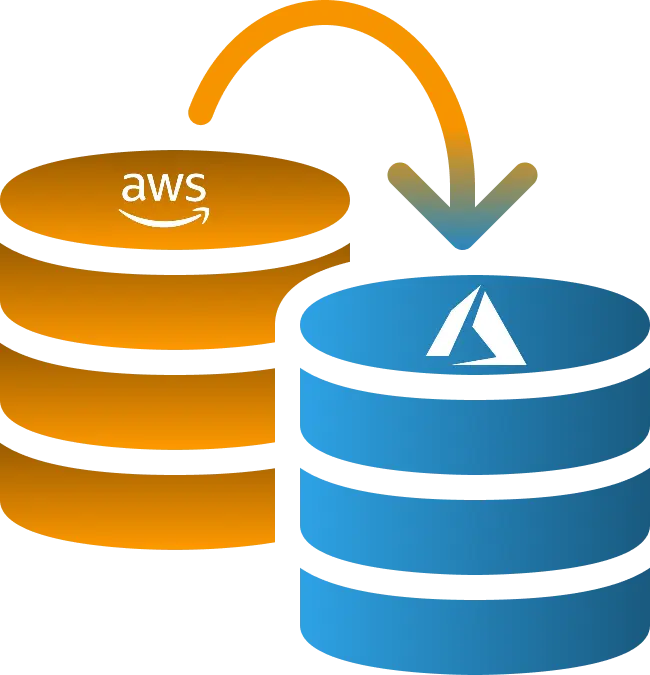
This makes it clear that more businesses are choosing Microsoft Azure and switching from AWS to Azure for their corporate needs!
Now let’s discuss some of the highly recommended practices for migrating from on-premises to Azure cloud.
Map Out Your Migration Game Plan
Before you start, define your objectives, whether it is aligned to faster performance, cost effectiveness, or better scalability. List all applications and systems you plan to move. Assign timelines, roles, and dependencies. Does a detailed plan reduce surprises later?
- Define clear goals: scalability, cost-saving, flexibility
- Identify workloads to migrate and prioritize them
- Choose your cloud provider (e.g., Azure, AWS) based on your needs
- Align timelines with business priorities
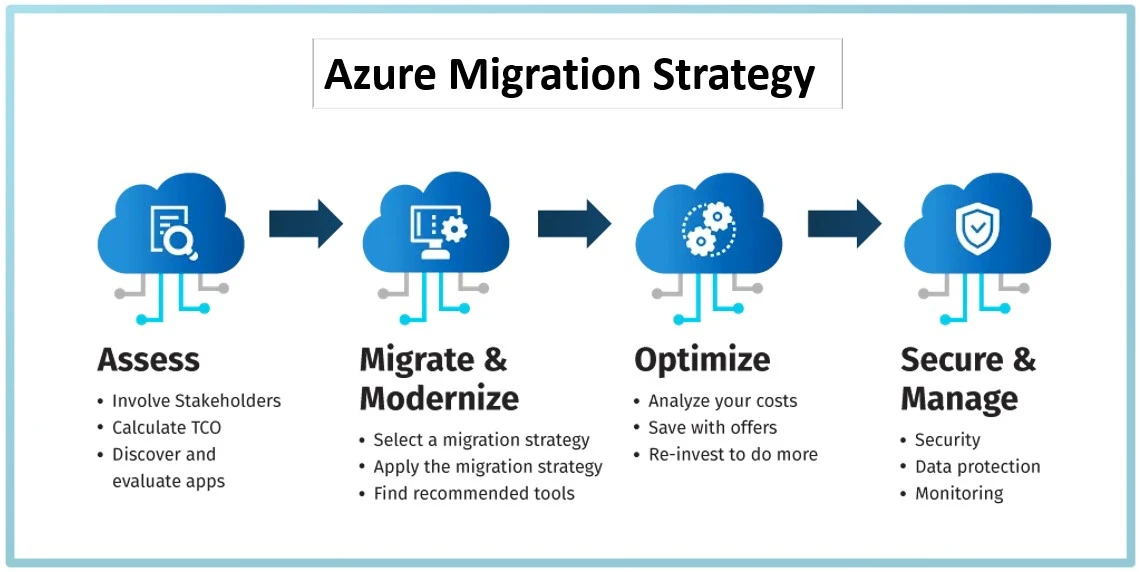
Recommended tips for On-Premise to Azure Migration
- Use tools like Azure Migrate or AWS Migration Hub for assessment.
- Use Azure Migrate to assess and plan your move with a guided toolset.
- Build a clear migration strategy using Azure’s cloud adoption framework.
- Leverage Azure Landing Zones to set up governance, networking, and security early.
Simplify database migration with our Azure DB Migration services
Know What You’re Working With
Before migrating to Azure or AWS, take stock of everything like applications, databases, servers, and API dependencies. Know which systems are critical, which are outdated, and which need upgrading.
- Identify systems not suited for migration
- Take inventory of all assets (hardware, applications, databases, workloads)
- Document app dependencies and licensing details
Just ask yourself:
- What absolutely needs to move?
- What can be deleted, modernized, or left behind?
Recommended Best Practices for On-Premise to Azure Migration
- Run Azure Migrate: Discovery and Assessment to auto-discover on-prem workloads.
- Identify dependencies using the Dependency Visualization Tool.
- Get cost estimates, performance data, and compatibility reports upfront.
Break It Down Into Phases
Split the migration into manageable parts. Start with low-risk workloads, then move to core systems and finally legacy or complex ones. This way, you can handle issues in smaller chunks without disrupting the entire business.
- Phase 1: Pilot migration with low-risk workloads
- Phase 2: Core systems and infrastructure
- Phase 3: Complex or legacy apps
Use phased deployment strategies like "pilot-light" or "blue-green."
Recommended Strategies for On-Premise to Azure Migration
- Use Azure Migrate Projects to create phase-wise plans for apps, databases, and VMs.
- Prioritize based on app criticality using Azure’s TCO calculator.
- Start with low-risk workloads before scaling to mission-critical apps.
Get a Grip on Costs Before You Move
Understand what you're really paying for—storage, bandwidth, licenses, etc. Use tools like Azure’s Pricing Calculator to forecast costs. Think ahead about spikes and usage changes to avoid any nasty surprises post-migration.
- Analyze Total Cost of Ownership (TCO)
- Use Azure Pricing Calculator or AWS Cost Estimator
- Don’t forget hidden costs: data egress, training, downtime
Table: Potential Hidden Costs & How to Handle Them
| Cost Type | What to Watch | Tool/Strategy |
|---|---|---|
| Storage & Backups | Overprovisioning | Auto-scaling, Archival tiers |
| Network Egress | Data transfers | Geo-location strategy |
| Resource Sprawl | Unused VMs | Tagging + regular audits |
Recommended tips for On Premise to Azure Migration
Unlock powerful insights of your business with Azure Synapse Analytics services
- Use the Azure Pricing Calculator to model different workloads.
- Set up Azure Cost Management + Billing to monitor and optimize spend.
- Consider Reserved Instances or Savings Plans for long-term cost efficiency.
Lock Down Security from Day One
Security isn’t something you add later—it’s built in from the start. Use encryption, firewall rules, and proper access controls. Lean into built-in cloud security features to protect your data at rest and in transit.
- Enable identity & access management (IAM)
- Use firewalls, encryption, and security policies
- Configure role-based access in Azure Active Directory
Must-Use Azure Security Tools:
- Microsoft Defender for Cloud
- Azure Key Vault
- Azure Policy
Suggested Tips for On-Premise to Azure Transition
- Enable Azure Defender for threat protection across services.
- Use Microsoft Defender for Cloud for centralized security posture management.
- Encrypt data using Azure Key Vault and Managed Identities.
Stay on Top of Compliance & Governance
Make sure your cloud setup meets all relevant industry standards like HIPAA, GDPR, or SOC 2. Set governance policies early so your cloud doesn’t turn into the Wild West. Use Azure Policy or AWS Config to stay compliant.
- Check compliance against HIPAA, SOC 2, PCI-DSS, etc.
- Establish policy-driven governance frameworks
- Leverage built-in tools like Azure Blueprints or AWS Config
Rhetorical Check: Do you really want auditors calling before your migration’s even done?
Recommended tips for On-Premise to Azure Migration
- Leverage Azure Policy to enforce rules on resources (e.g., region, size).
- Use Azure Blueprints for ready-made compliance templates (e.g., ISO, GDPR).
- Monitor compliance posture using Microsoft Purview Compliance Manager.
Connect and manage your IoT assets effortlessly with Azure IoT Hub consulting services
Pick the Best Migration Approach
Choose between Lift-and-Shift, Replatform, or Refactor based on your goals and timeline. Quick wins? Go with Lift-and-Shift. Long-term gains? Refactor. Don’t over-engineer if your business doesn’t need it.
Migration Models:
- Lift and Shift: Fastest, minimal changes
- Replatforming: Minor tweaks for optimization
- Refactoring: Rebuilding for cloud-native
Match the strategy with your business and tech goals.
Recommended Practices for On-Premise to Azure Migration
- Choose Lift & Shift with Azure Site Recovery for quick migrations.
- Opt for Replatforming using Azure App Service or Azure SQL Database.
- For long-term modernization, go with Refactoring using Azure Kubernetes Service (AKS).
Plan for Downtime & Disaster Recovery
Whenever you go for data migration from on premise to azure cloud
Always assume something might go wrong. Plan for downtime, set recovery points, and have backup strategies. Define RTO and RPO so you know exactly how much time and data loss you can tolerate.
- Set RTO (Recovery Time Objective) and RPO (Recovery Point Objective)
- Build redundancy with Availability Zones or Regions
- Create and test DR plans regularly
What If Scenario:
- What if your core app fails post-migration—how fast can you recover?
Recommended Strategies for On-Premise to Azure Migration
- Set up Azure Site Recovery for real-time replication and failover.
- Use Azure Backup to ensure secure, reliable recovery points.
- Define RTO and RPO clearly with built-in disaster recovery capabilities.
Make the Most of Azure’s Native Services
Instead of copying everything from your on-premise setup, use cloud-native options like Azure SQL, Logic Apps, or App Services. They’re optimized, scalable, and fully supported. Plus, they cut down maintenance work for your team.
Always assume something might go wrong. Plan for downtime, set recovery points, and have backup strategies. Define RTO and RPO so you know exactly how much time and data loss you can tolerate.
- Use Azure Functions for serverless computing
- Leverage Azure SQL Database instead of maintaining SQL servers
-
Replace legacy services with Azure Logic Apps, Azure App Services, etc.
Recommended tips for On-Premise to Azure Migration
- Replace legacy tools with Azure-native solutions like Logic Apps, Functions, and Cosmos DB.
- Use Platform-as-a-Service (PaaS) offerings for better scalability and less maintenance.
- Rely on Azure DevOps for end-to-end project and code management.
Extend your data management with our MS Azure Arc Data Services
Keep an Eye on Performance with Monitoring Tools
Set up real-time monitoring for your systems. Use tools like Azure Monitor or Application Insights to track errors, latency, and resource usage. Catch issues early and respond faster to avoid outages or slowdowns.
- Monitor CPU, memory, latency, and usage metrics in real time
- Use Azure Monitor, Application Insights, or Log Analytics
- Set alerts and thresholds to act early
Pro Tip: Create dashboards by role—DevOps, Security, Finance—to focus on what matters most.
Expert Tips for On-Premise to Azure Transition
- Use Azure Monitor for real-time system health and alerts.
- Integrate Application Insights for detailed app-level performance tracking.
- Enable Log Analytics to collect and analyze telemetry data.
Automate Everything You Can
Automate infrastructure setup with IaC tools like Bicep, ARM templates, or Terraform. Use CI/CD pipelines to deploy changes smoothly. The less manual work you do, the fewer mistakes and delays you'll face.
- Use Infrastructure as Code (IaC) with Bicep, Terraform, or ARM templates
- Automate provisioning, testing, and deployment
- Implement CI/CD pipelines for continuous delivery
Let scripts and pipelines do the heavy lifting while your team focuses on innovation.
Expert Tips for On-Premise to Azure Transition
- Automate infrastructure using ARM templates, Bicep, or Terraform on Azure.
- Use Azure Automation for patching, script execution, and configuration management.
- Set up CI/CD with GitHub Actions or Azure DevOps Pipelines.
Streamline project deployment with our Azure CI/CD pipeline services
12. Tighten Up Access & Identity Controls
Control who gets access to what. Use role-based access, enforce multi-factor authentication, and review permissions regularly. Your cloud is only as secure as your weakest user policy
- Set up multi-factor authentication (MFA)
- Use Conditional Access policies
- Regularly review access logs and privileges
Keep reviewing and rotating credentials—it’s not a “set and forget” task.
Recommended tips for On-Premise to Azure Cloud Migration
- Use Azure Active Directory (Azure AD) for centralized identity and SSO.
- Set up Conditional Access and Multi-Factor Authentication (MFA).
- Apply role-based access control (RBAC) for permission management.
13. Ensure Strong Network Connectivity
Invest in secure, high-speed connectivity options like ExpressRoute or VPNs. Optimize routing and DNS for faster performance. Poor network planning can bottleneck even the best cloud systems.
- Use ExpressRoute or VPN Gateways for hybrid connectivity
- Optimize DNS, routing, and traffic load balancing
- Secure endpoints and ports with NSGs and ASGs
Smooth, fast, and secure connections keep cloud resources humming.
Tips for On premise to cloud migration Azure
- Establish private, fast links with Azure ExpressRoute or VPN Gateway.
- Secure traffic using Azure Firewall and Network Security Groups (NSGs).
- Optimize connectivity using Azure Front Door and Traffic Manager.
Manage your identities securely with our Microsoft Entra ID consulting services
14. Invest in Training for Your Team
Train your staff on the cloud tools and platforms you’re adopting. Offer certifications, hands-on labs, and regular learning sessions. A skilled team prevents mistakes, manages systems better, and drives innovation.
- Provide cloud certification paths (Azure Fundamentals, Solutions Architect, etc.)
- Run hands-on labs or sandboxes for practice
- Create a knowledge-sharing culture through lunch-and-learns
Ask Yourself: Is your team cloud-ready, or just cloud-aware?
Tips for migrating from On Premise to Azure
- Enroll your team in Microsoft Learn and Azure certification paths (AZ-900, AZ-104, etc.).
- Use Azure Labs for sandbox environments to practice cloud skills.
- Access Microsoft Learn for Organizations for team-wide training and tracking.
15. Test Everything Before You Go Live
Before you migrate on-premises machines to Azure, test every part of your setup—performance, backups, access, and recovery plans. Simulate real-world loads and user scenarios. The earlier you catch issues, the cheaper and easier they are to fix.
- Conduct unit, load, and regression tests
- Perform UAT with real users
- Validate all backup and failover systems
Checklist Before Go-Live:
- All services are up and reachable
- DNS switched and verified
- Monitoring and alerting enabled
- Performance benchmarks met
Best practices for moving data from on premise to Azure
- Run migration test scenarios using Azure Migrate’s Test Migrate feature.
- Use Azure Load Testing to simulate production-scale traffic.
- Validate backups, failover mechanisms, and security policies thoroughly.
On premise to Azure Cloud Migration – Wrapping Up
Migrating from on-premise to Azure cloud can be a game-changer for your business if you adopt it following the right practices.
You could reap numerous benefits which you do not get from on premises infrastructure. For example, cost savings, app scalability, strong security, and much more.
In this blog, we discussed 15 Cloud Migration Best Practices – On premises to Azure cloud.
By conducting a thorough assessment, developing a clear strategy, ensuring your team is well-trained, prioritizing security, and continuously monitoring your cloud environment, you can avoid common pitfalls and maximize the advantages of Microsoft Azure cloud technology.
Wanna migrate On-premises machines to Azure Cloud? Connect with iFour, a leading Azure migration services provider, and make your cloud migration easy and effortless!
Whether you're moving from GCP to Azure or switching from on premises to Azure, our team is here to help with MS Azure consulting services.
On Premise to Cloud Migration (Azure) – 15 Best Practices CTOs often worry about moving to the cloud, and when they do, they overlook the risks involved, which causes them to wonder, 'Why does cloud migration fail?' Facts reveal that 75% of Cloud migrations fail due to businesses not paying enough attention to the tips and practices of cloud migration. So, keeping focus is essential to make your leap to the cloud without stumbling. Now, what benefits do you get by migrating on-premises to Azure? - No additional spending on hardware and upkeep. - You get to pay for what you use - Gain access to your apps and essentials from anywhere. - Cloud security makes your data safer than on premises - Updated tools and many more. In this blog, we will discuss 15 best practices for moving data from on-premises to Azure. Best Practices for On premise to Cloud Migration Microsoft Azure is leading the pack with an impressive 80% adoption rate, edging out AWS (Amazon Web Services) at 78%! This milestone makes Azure the first cloud provider to hit the 80% adoption mark, according to Flexera's State of the Cloud Report. This makes it clear that more businesses are choosing Microsoft Azure and switching from AWS to Azure for their corporate needs! Now let’s discuss some of the highly recommended practices for migrating from on-premises to Azure cloud. Map Out Your Migration Game Plan Before you start, define your objectives, whether it is aligned to faster performance, cost effectiveness, or better scalability. List all applications and systems you plan to move. Assign timelines, roles, and dependencies. Does a detailed plan reduce surprises later? Define clear goals: scalability, cost-saving, flexibility Identify workloads to migrate and prioritize them Choose your cloud provider (e.g., Azure, AWS) based on your needs Align timelines with business priorities Recommended tips for On-Premise to Azure Migration Use tools like Azure Migrate or AWS Migration Hub for assessment. Use Azure Migrate to assess and plan your move with a guided toolset. Build a clear migration strategy using Azure’s cloud adoption framework. Leverage Azure Landing Zones to set up governance, networking, and security early. Simplify database migration with our Azure DB Migration services Contact us Know What You’re Working With Before migrating to Azure or AWS, take stock of everything like applications, databases, servers, and API dependencies. Know which systems are critical, which are outdated, and which need upgrading. Identify systems not suited for migration Take inventory of all assets (hardware, applications, databases, workloads) Document app dependencies and licensing details Just ask yourself: What absolutely needs to move? What can be deleted, modernized, or left behind? Recommended Best Practices for On-Premise to Azure Migration Run Azure Migrate: Discovery and Assessment to auto-discover on-prem workloads. Identify dependencies using the Dependency Visualization Tool. Get cost estimates, performance data, and compatibility reports upfront. Read More: 17 Reasons Why Companies Migrate from AWS to Azure Break It Down Into Phases Split the migration into manageable parts. Start with low-risk workloads, then move to core systems and finally legacy or complex ones. This way, you can handle issues in smaller chunks without disrupting the entire business. Phase 1: Pilot migration with low-risk workloads Phase 2: Core systems and infrastructure Phase 3: Complex or legacy apps Use phased deployment strategies like "pilot-light" or "blue-green." Recommended Strategies for On-Premise to Azure Migration Use Azure Migrate Projects to create phase-wise plans for apps, databases, and VMs. Prioritize based on app criticality using Azure’s TCO calculator. Start with low-risk workloads before scaling to mission-critical apps. Get a Grip on Costs Before You Move Understand what you're really paying for—storage, bandwidth, licenses, etc. Use tools like Azure’s Pricing Calculator to forecast costs. Think ahead about spikes and usage changes to avoid any nasty surprises post-migration. Analyze Total Cost of Ownership (TCO) Use Azure Pricing Calculator or AWS Cost Estimator Don’t forget hidden costs: data egress, training, downtime Table: Potential Hidden Costs & How to Handle Them Cost Type What to Watch Tool/Strategy Storage & Backups Overprovisioning Auto-scaling, Archival tiers Network Egress Data transfers Geo-location strategy Resource Sprawl Unused VMs Tagging + regular audits Recommended tips for On Premise to Azure Migration Unlock powerful insights of your business with Azure Synapse Analytics services Contact us Use the Azure Pricing Calculator to model different workloads. Set up Azure Cost Management + Billing to monitor and optimize spend. Consider Reserved Instances or Savings Plans for long-term cost efficiency. Lock Down Security from Day One Security isn’t something you add later—it’s built in from the start. Use encryption, firewall rules, and proper access controls. Lean into built-in cloud security features to protect your data at rest and in transit. Enable identity & access management (IAM) Use firewalls, encryption, and security policies Configure role-based access in Azure Active Directory Must-Use Azure Security Tools: Microsoft Defender for Cloud Azure Key Vault Azure Policy Suggested Tips for On-Premise to Azure Transition Enable Azure Defender for threat protection across services. Use Microsoft Defender for Cloud for centralized security posture management. Encrypt data using Azure Key Vault and Managed Identities. Read More: Azure DevOps Pipeline Deployment for Competitive Business: The Winning Formula Stay on Top of Compliance & Governance Make sure your cloud setup meets all relevant industry standards like HIPAA, GDPR, or SOC 2. Set governance policies early so your cloud doesn’t turn into the Wild West. Use Azure Policy or AWS Config to stay compliant. Check compliance against HIPAA, SOC 2, PCI-DSS, etc. Establish policy-driven governance frameworks Leverage built-in tools like Azure Blueprints or AWS Config Rhetorical Check: Do you really want auditors calling before your migration’s even done? Recommended tips for On-Premise to Azure Migration Leverage Azure Policy to enforce rules on resources (e.g., region, size). Use Azure Blueprints for ready-made compliance templates (e.g., ISO, GDPR). Monitor compliance posture using Microsoft Purview Compliance Manager. Connect and manage your IoT assets effortlessly with Azure IoT Hub consulting services Get in touch Pick the Best Migration Approach Choose between Lift-and-Shift, Replatform, or Refactor based on your goals and timeline. Quick wins? Go with Lift-and-Shift. Long-term gains? Refactor. Don’t over-engineer if your business doesn’t need it. Migration Models: Lift and Shift: Fastest, minimal changes Replatforming: Minor tweaks for optimization Refactoring: Rebuilding for cloud-native Match the strategy with your business and tech goals. Recommended Practices for On-Premise to Azure Migration Choose Lift & Shift with Azure Site Recovery for quick migrations. Opt for Replatforming using Azure App Service or Azure SQL Database. For long-term modernization, go with Refactoring using Azure Kubernetes Service (AKS). Read More: Is It Worth Using Azure With Power Platforms For Financial Business? Plan for Downtime & Disaster Recovery Whenever you go for data migration from on premise to azure cloud Always assume something might go wrong. Plan for downtime, set recovery points, and have backup strategies. Define RTO and RPO so you know exactly how much time and data loss you can tolerate. Set RTO (Recovery Time Objective) and RPO (Recovery Point Objective) Build redundancy with Availability Zones or Regions Create and test DR plans regularly What If Scenario: What if your core app fails post-migration—how fast can you recover? Recommended Strategies for On-Premise to Azure Migration Set up Azure Site Recovery for real-time replication and failover. Use Azure Backup to ensure secure, reliable recovery points. Define RTO and RPO clearly with built-in disaster recovery capabilities. Make the Most of Azure’s Native Services Instead of copying everything from your on-premise setup, use cloud-native options like Azure SQL, Logic Apps, or App Services. They’re optimized, scalable, and fully supported. Plus, they cut down maintenance work for your team. Always assume something might go wrong. Plan for downtime, set recovery points, and have backup strategies. Define RTO and RPO so you know exactly how much time and data loss you can tolerate. Use Azure Functions for serverless computing Leverage Azure SQL Database instead of maintaining SQL servers Replace legacy services with Azure Logic Apps, Azure App Services, etc. Recommended tips for On-Premise to Azure Migration Replace legacy tools with Azure-native solutions like Logic Apps, Functions, and Cosmos DB. Use Platform-as-a-Service (PaaS) offerings for better scalability and less maintenance. Rely on Azure DevOps for end-to-end project and code management. Extend your data management with our MS Azure Arc Data Services Let’s connect Keep an Eye on Performance with Monitoring Tools Set up real-time monitoring for your systems. Use tools like Azure Monitor or Application Insights to track errors, latency, and resource usage. Catch issues early and respond faster to avoid outages or slowdowns. Monitor CPU, memory, latency, and usage metrics in real time Use Azure Monitor, Application Insights, or Log Analytics Set alerts and thresholds to act early Pro Tip: Create dashboards by role—DevOps, Security, Finance—to focus on what matters most. Expert Tips for On-Premise to Azure Transition Use Azure Monitor for real-time system health and alerts. Integrate Application Insights for detailed app-level performance tracking. Enable Log Analytics to collect and analyze telemetry data. Read More: Azure SQL vs MySQL Database: Which is Right for You? Automate Everything You Can Automate infrastructure setup with IaC tools like Bicep, ARM templates, or Terraform. Use CI/CD pipelines to deploy changes smoothly. The less manual work you do, the fewer mistakes and delays you'll face. Use Infrastructure as Code (IaC) with Bicep, Terraform, or ARM templates Automate provisioning, testing, and deployment Implement CI/CD pipelines for continuous delivery Let scripts and pipelines do the heavy lifting while your team focuses on innovation. Expert Tips for On-Premise to Azure Transition Automate infrastructure using ARM templates, Bicep, or Terraform on Azure. Use Azure Automation for patching, script execution, and configuration management. Set up CI/CD with GitHub Actions or Azure DevOps Pipelines. Streamline project deployment with our Azure CI/CD pipeline services Contact now 12. Tighten Up Access & Identity Controls Control who gets access to what. Use role-based access, enforce multi-factor authentication, and review permissions regularly. Your cloud is only as secure as your weakest user policy Set up multi-factor authentication (MFA) Use Conditional Access policies Regularly review access logs and privileges Keep reviewing and rotating credentials—it’s not a “set and forget” task. Recommended tips for On-Premise to Azure Cloud Migration Use Azure Active Directory (Azure AD) for centralized identity and SSO. Set up Conditional Access and Multi-Factor Authentication (MFA). Apply role-based access control (RBAC) for permission management. Read More: Azure Synapse Analytics vs Databricks: 22 Differences Explained 13. Ensure Strong Network Connectivity Invest in secure, high-speed connectivity options like ExpressRoute or VPNs. Optimize routing and DNS for faster performance. Poor network planning can bottleneck even the best cloud systems. Use ExpressRoute or VPN Gateways for hybrid connectivity Optimize DNS, routing, and traffic load balancing Secure endpoints and ports with NSGs and ASGs Smooth, fast, and secure connections keep cloud resources humming. Tips for On premise to cloud migration Azure Establish private, fast links with Azure ExpressRoute or VPN Gateway. Secure traffic using Azure Firewall and Network Security Groups (NSGs). Optimize connectivity using Azure Front Door and Traffic Manager. Manage your identities securely with our Microsoft Entra ID consulting services Get in touch 14. Invest in Training for Your Team Train your staff on the cloud tools and platforms you’re adopting. Offer certifications, hands-on labs, and regular learning sessions. A skilled team prevents mistakes, manages systems better, and drives innovation. Provide cloud certification paths (Azure Fundamentals, Solutions Architect, etc.) Run hands-on labs or sandboxes for practice Create a knowledge-sharing culture through lunch-and-learns Ask Yourself: Is your team cloud-ready, or just cloud-aware? Tips for migrating from On Premise to Azure Enroll your team in Microsoft Learn and Azure certification paths (AZ-900, AZ-104, etc.). Use Azure Labs for sandbox environments to practice cloud skills. Access Microsoft Learn for Organizations for team-wide training and tracking. 15. Test Everything Before You Go Live Before you migrate on-premises machines to Azure, test every part of your setup—performance, backups, access, and recovery plans. Simulate real-world loads and user scenarios. The earlier you catch issues, the cheaper and easier they are to fix. Conduct unit, load, and regression tests Perform UAT with real users Validate all backup and failover systems Read More: How Serverless and Azure Technologies are Reshaping the Healthcare Sector? Checklist Before Go-Live: All services are up and reachable DNS switched and verified Monitoring and alerting enabled Performance benchmarks met Best practices for moving data from on premise to Azure Run migration test scenarios using Azure Migrate’s Test Migrate feature. Use Azure Load Testing to simulate production-scale traffic. Validate backups, failover mechanisms, and security policies thoroughly. On premise to Azure Cloud Migration – Wrapping Up Migrating from on-premise to Azure cloud can be a game-changer for your business if you adopt it following the right practices. You could reap numerous benefits which you do not get from on premises infrastructure. For example, cost savings, app scalability, strong security, and much more. In this blog, we discussed 15 Cloud Migration Best Practices – On premises to Azure cloud. By conducting a thorough assessment, developing a clear strategy, ensuring your team is well-trained, prioritizing security, and continuously monitoring your cloud environment, you can avoid common pitfalls and maximize the advantages of Microsoft Azure cloud technology. Wanna migrate On-premises machines to Azure Cloud? Connect with iFour, a leading Azure migration services provider, and make your cloud migration easy and effortless! Whether you're moving from GCP to Azure or switching from on premises to Azure, our team is here to help with MS Azure consulting services.

Kapil Panchal
A passionate Technical writer and an SEO freak working as a Content Development Manager at iFour Technolab, USA. With extensive experience in IT, Services, and Product sectors, I relish writing about technology and love sharing exceptional insights on various platforms. I believe in constant learning and am passionate about being better every day.


Build Your Agile Team
Recent Posts
-

How to Do Forecasting in Power BI (Steps & Accuracy Metrics)
December 02, 2025
-
ETL vs ELT: Key Differences, Benefits & Use Cases Explained
November 26, 2025
-
Modernizing applications with the 7 R strategy – A CTO’s Guide
October 16, 2025
-
Top Shift Left security Best Practices CTOs should consider
October 10, 2025
-
Real-world Consequences of Ignoring DevSecOps In Your Strategy
September 29, 2025


Categories
- .NET Framework (102)
- Amazon API : MWS (2)
- Blockchain Development (41)
- Charting tools (2)
- Digital Currency (3)
- JavaScript frameworks (5)
- NopCommerce (2)
- Telerik AppBuilder (2)
- Xamarin (16)
- IoT - Internet of Things (5)
- Node.js Development (21)
- VueJs (4)
- Angular Development (63)
- ASP.NET Development (106)
- Javascript (3)
- Ionic (3)
- WPF Development (16)
- C# development (10)
- MVC development (22)
- Java Development (14)
- React JS (28)
- Other Software Technologies (48)