The NgStyle attribute is used to change the appearance and behavior of the element. NgSytle is most useful when the value is dynamic.
We can set the styles using the ngStyle directive.
As you can see in the above example of the NgStyle, this sets the background color of the div to red.
We can add multiple CSS properties in a ngStyle directive.
As you can see in the above example of the ngStyle, this sets the multiple CSS properties to the div element like background-color, color, font-size, etc.
Example 1
In this example, we will use ngStyle for styling and can write the inline CSS on the element.
Example 2
app.components.ts
    import { Component } from '@angular/core';
    @Component({
    selector: 'app-root',
    templateUrl: './app.component.html',
    styleUrls: ['./app.component.scss']
    })
    export class AppComponent {
    title = 'NgStyleDemo';

    myCss = {
    'background-color' : 'green',
    'color' : 'white',
    'font-size' : '40px',
    'font-weight' : 'bold',
    };
    }
app.component.html
In this example, we can write the CSS in the app.component.ts file and use the CSS variable in the ngstyle directive in the app.component.html file.
Example 3
Step 1: In the ngstyle.component.ts file, we can declare an array of the data.
    import { Component, OnInit } from '@angular/core';
    @Component({
      selector: 'app-ngstyle',
      templateUrl: './ngstyle.component.html',
      styleUrls: ['./ngstyle.component.scss']
    })
    export class DirectiveComponent implements OnInit {
      constructor() { }
      ngOnInit(): void {
      }
      people: any[] = [
        {
          "name": "Keval Patel",
          "country": 'India'
        },
        {
          "name": "Mcleod Mueller",
          "country": 'USA'
        },
        {
          "name": "Aniket Badrakiya",
          "country": 'UK'
        },
        {
          "name": "Neel Patel",
          "country": 'India'
        },
        {
          "name": "Cook Tyson",
          "country": 'USA'
        },
        {
          "name": "Vishal Rathod",
          "country": 'India'
        }
      ];
    }
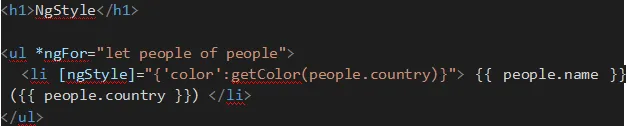
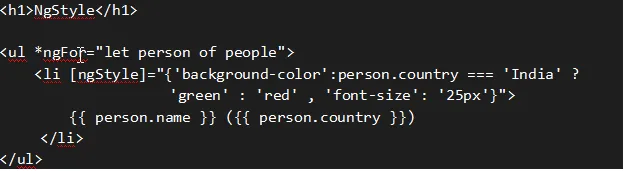
Step 2: Create an HTML view.
Example 4
    import { Component } from '@angular/core';
    @Component({
      selector: 'app-root',
      templateUrl: './app.component.html',
      styleUrls: ['./app.component.scss']
    })
    export class AppComponent {
      title = 'NgStyleDemo';
      people: any[] = [
        {
          "name": "Keval Patel",
          "country": 'India'
        },
        {
          "name": "Mcleod Mueller",
          "country": 'USA'
        },
        {
          "name": "Aniket Badrakiya",
          "country": 'UK'
        },
        {
          "name": "Neel Patel",
          "country": 'Canada'
        },
        {
          "name": "Cook Tyson",
          "country": 'USA'
        },
        {
          "name": "Vishal Rathod",
          "country": 'UK'
        },
        {
          "name": "Meha Patel",
          "country": 'India'
        },
        {
          "name": "Ayush Desai",
          "country": 'Australia'
        },
        {
          "name": "Riya Rathod",
          "country": 'Canada'
        }
      ];
      getColor(country) {
        switch (country) {
          case 'India':
            return 'blue';
          case 'UK':
            return 'red';
          case 'Australia':
            return 'yellow';
          case 'USA':
            return 'green';
          case 'Canada':
            return 'orange';
        }
      }
    }
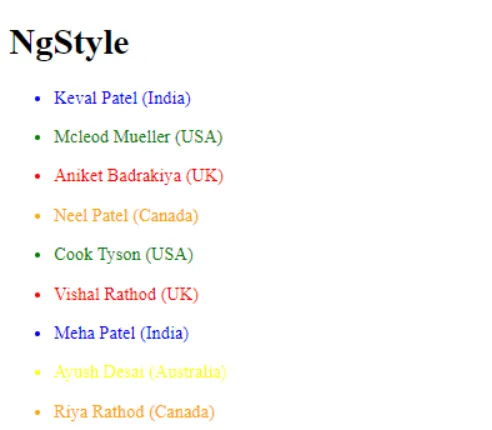
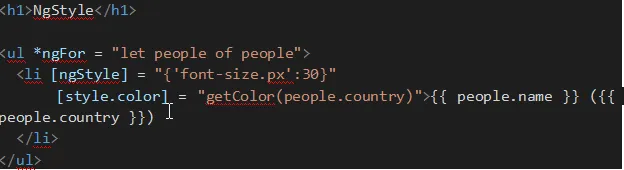
Create a HTML view to display the data.